Das Produkt befindet sich in einem externen Lager. Die Lieferfrist: ca. 7-9 Werktage.. Mehr Info
Versandoptionen - Wird im Checkout ausgewählt
Versand mit DHL - PaketShop
Kostenloser Versand
Versand mit DHL zur Adresse
Kostenloser Versand
Versand mit GLS - PaketShop
Kostenloser Versand
Versand mit GLS zur Adresse
Kostenloser Versand
Alle Versandoptionen anzeigen (4)
EUR
666,97
ex. MwSt. 560,48
Gesamtbetrag inkl. Versand.
666,97
Die Funktion setzt voraus, dass Sie angemeldet sind. Erstellen Sie einen Nutzer und verwenden Sie unser intelligentes Listensystem, um zukünftige Einkäufe, regelmäßige Einkäufe oder Wunschlisten zu verfolgen. Jetzt registrieren Anmelden
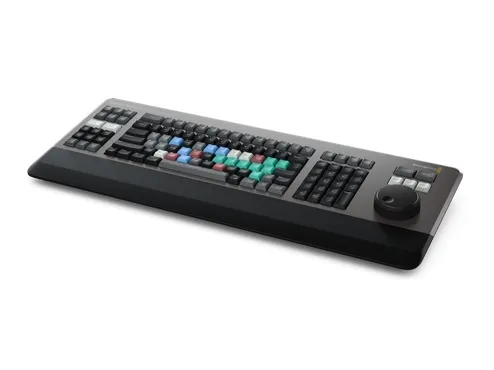
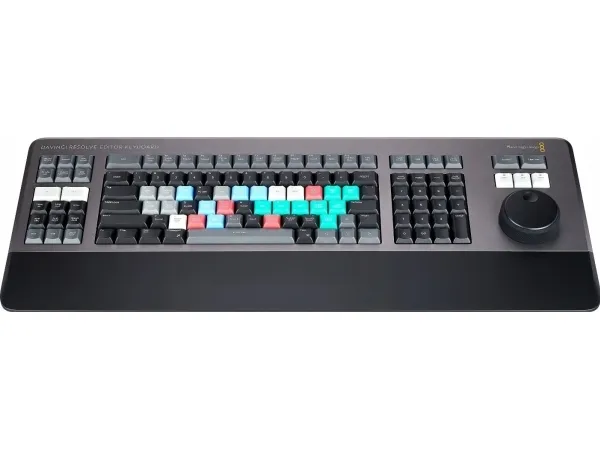
World's Best DaVinci Keyboard The new DaVinci Resolve Editor Keyboard also includes a revised QWERTY key layout that’s been updated using feedback from professional editors. However you still get all the traditional editing features for both the cut and edit pages in DaVinci Resolve, so the core QWERTY part of the keyboard still operates in a familiar way. All the standard edit modes are included on the main keyboard. Plus, you get JKL trimming when you want to do playback and trimming via the keyboard and not the search dial. But you still get new features in the revised layout, such as a viewer button to allow instant change to full screen view, and it’s even possible to edit from the keyboard in full screen view!
Search Dial Control with Clutch The integrated search dial is machined metal with rubber coating so it feels very nice to use and you always feel you have solid control over DaVinci Resolve’s clips or timeline. There's an integrated electronic clutch that creates end stops when used for shuttle and position, all under software control. With multiple roller bearings, the search dial is very smooth and it can be spun in jog mode to allow a natural timeline scroll. The jog control allows free movement for precise positioning of the playback point. Shuttle uses the clutch and you can rotate forward and reverse wind to move up and down the timeline. Scroll allows scrolling up and down a long edit to navigate quickly.
Direct Timecode Entry Keypad When entering edit points and durations numerically, there's a keypad specifically designed for timecode entry. The F/TC button allows switching between timecode or frames. Just press the F/TC button and enter changes to frames. When typing longer timecode values, there's also a double zero button so you don't have to press the standard zero key as often. The plus and minus keys allow time values as offsets to current values vs absolute entry. A dedicated duration entry button allows you to numerically define the duration of a clip. Numeric duration entry is one of the most used functions! For example, if you need to set a 100 frame duration on a clip, just press DUR, F/TC and 100!
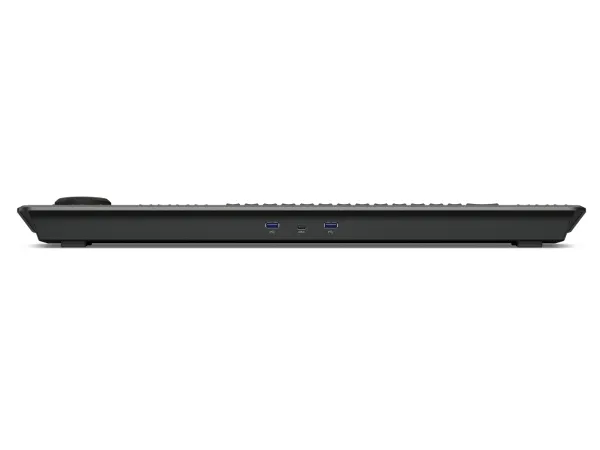
Desktop or Inset into a Console! Although the DaVinci Resolve Editor Keyboard has been designed with a modern aesthetic, there's also function to the form! The subtle edge created between the top keyboard surface and the lower chassis has a streamlined feel to the design that allows the keyboard to look good on a desktop. Plus, the keyboard is a fantastic visual match to the latest computers that feature futuristic design. There's even fold out feet to increase the keyboard tilt! However the flange has a functional benefit as you can install the keyboard in a cutout of a desk or console. When mounted into a desk, the keyboard will sit perfectly flat to the desk surface. This creates an amazing console look!
Bin and Source Tape The full sized keyboard also features sorting keys to allow the source tape to be rearranged into different sort orders at the press of a button. You can sort the source tape by time, camera, duration or even clip name. The moment one of the bin sort buttons is selected, the source tape will be regenerated in that bin’s sort order. Simply scroll up and down the source tape to find the shots needed! Sort by timecode to see all the bin media sorted by time, which is perfect for content shot in time order, such as live events. You can also sort by camera which is great for multi camera shoots where you need to find cut aways on specific cameras. You can even sort by duration and the clip name!
Produktfarbe
Schwarz, Grau
Das Produkt hat folgende Artikelnummer in unserem System
EAN:
9338716006261
Warum ist ein und dasselbe Produkt unter verschiedenen Artikelnummern erhältlich?
Hersteller bringen oft dasselbe Produkt unter verschiedenen Artikelnummern auf den Markt, in der Regel handelt es sich dabei nur um unterschiedliche Versionen der Verpackung. Die Verpackung kann zum Beispiel für verschiedene Länder bestimmt sein.
Wir versuchen unser Bestes, um die Produkte zu vereinheitlichen, aber es kann vorkommen, dass dasselbe Produkt unter verschiedenen Artikelnummern in unserem System erscheint.